
Callback Functions in JavaScript
Before callbacks make sense, one thing needs to click first: in JavaScript, functions are values. You can store them in variables, pass them into other functions, and return them — just like a number or a string. Callbacks are built entirely on that idea.
1. Functions as Values
Most languages treat functions as special syntax. JavaScript treats them as data.js
// A function stored in a variable
const greet = function(name) {
  return `Hello, ${name}`;
};

// A function stored in an object
const utils = {
  double: function(n) { return n * 2; }
};

// A function passed as an argument — this is a callback
function runTwice(fn) {
  fn();
  fn();
}

runTwice(function() {
  console.log("called");
});
// called
// called
The moment you pass a function as an argument to another function, the passed function is called a callback — because the receiving function will call it back at some point.
2. What a Callback Function Is
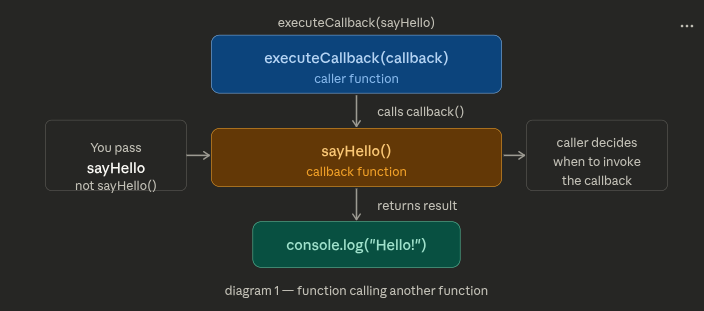
A callback is simply a function you hand to another function, letting that other function decide when to call it.js
// sayHello is the callback here
function sayHello() {
  console.log("Hello!");
}

function executeCallback(callback) {
  console.log("About to run your function...");
  callback(); // calls it back
}

executeCallback(sayHello);
// About to run your function...
// Hello!
Notice: you pass sayHello — not sayHello(). The parentheses would call it immediately. Without parentheses, you're handing the function itself as a value, and letting executeCallback decide when to invoke it.js
// Common mistake — calling instead of passing
executeCallback(sayHello());  // runs sayHello immediately, passes its return value (undefined)
executeCallback(sayHello);    // correct — passes the function itself
3. Why Callbacks Exist — Async Programming
JavaScript runs in a single thread. When you make a network request or read a file, the program can't freeze and wait — it would block everything else. The solution: start the operation, hand it a callback, and continue running. When the operation finishes, it calls your callback with the result.js
// Synchronous — blocks until done (bad for slow operations)
const data = readFileSync("users.json");
console.log(data); // nothing else runs while file is being read

// Asynchronous with callback — non-blocking
readFile("users.json", function(error, data) {
  // this runs later, when the file is ready
  if (error) {
    console.error("Failed:", error);
    return;
  }
  console.log(data);
});

console.log("This runs immediately, without waiting for the file");
The callback pattern is how JavaScript says: "I'll start this operation. You tell me what to do when it's done."
4. Passing Functions as Arguments
Callbacks appear everywhere in JavaScript — not just in async code. Any time behavior needs to be customizable or deferred, callbacks are the natural fit.
Array methods — the most common place you'll use callbacks day-to-day:js
const numbers = [1, 2, 3, 4, 5];

// forEach — callback runs once per element
numbers.forEach(function(num) {
  console.log(num * 2);
});

// filter — callback decides which elements to keep
const evens = numbers.filter(function(num) {
  return num % 2 === 0;
});
// [2, 4]

// map — callback transforms each element
const doubled = numbers.map(function(num) {
  return num * 2;
});
// [2, 4, 6, 8, 10]

// Same with arrow functions — shorter syntax, same callback concept
const tripled = numbers.map(num => num * 3);
Event listeners — a callback registered for a future user action:js
const button = document.querySelector("#submit");

// The callback fires whenever the button is clicked
button.addEventListener("click", function(event) {
  console.log("Button clicked!", event.target);
});
setTimeout / setInterval — defer or repeat execution:js
// Run callback once after 2 seconds
setTimeout(function() {
  console.log("2 seconds have passed");
}, 2000);

// Run callback every 1 second
const timer = setInterval(function() {
  console.log("tick");
}, 1000);
Custom functions with callbacks — designing your own callback-accepting functions:js
// A function that fetches a user and calls back with the result
function getUser(userId, onSuccess, onError) {
  fetch(`/api/users/${userId}`)
    .then(res => res.json())
    .then(user => onSuccess(user))
    .catch(err => onError(err));
}

getUser(
  42,
  function(user) { console.log("Got user:", user.name); },
  function(err)  { console.error("Error:", err); }
);
5. The Callback Nesting Problem
Callbacks work well for a single async step. But real applications often need multiple steps in sequence — get a user, then get their orders, then get order details. Each step depends on the previous one, so each step goes inside the previous callback.
js
// Step 1: get user
getUser(userId, function(user) {

  // Step 2: get orders for that user
  getOrders(user.id, function(orders) {

    // Step 3: get details of the first order
    getOrderDetails(orders[0].id, function(details) {

      // Step 4: get the product in that order
      getProduct(details.productId, function(product) {

        // finally do something useful
        console.log("Product:", product.name);

      });
    });
  });
});
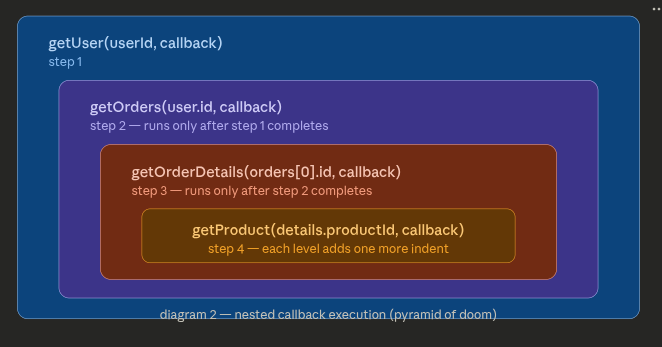
This pattern is called callback hell — or the pyramid of doom, because of the shape it makes. The problems it causes:
Hard to read — logic flows diagonally, not top-to-bottom
Hard to handle errors — you need error handling at every level independently
Hard to debug — stack traces become meaningless deep inside nested anonymous functions
Hard to reuse — the inner logic is trapped inside the outer callback
The problem isn't callbacks themselves — it's sequential async operations expressed as nested callbacks. This is exactly the problem that Promises and async/await were designed to solve (which are the natural next topics after understanding callbacks).


