
JavaScript Error Handling: Writing Robust Code

1. What are Errors in JavaScript?
Errors in JavaScript are objects that occur when something goes wrong during code execution. Unlike other languages, JavaScript doesn't always stop completely—it throws an error that you can catch and handle gracefully.
There are several types of JavaScript errors:
SyntaxError: Occurs when you write code that breaks JavaScript grammar rules (missing brackets, incorrect syntax)
ReferenceError: Happens when you try to use a variable that doesn't exist
TypeError: Occurs when a value isn't of the expected type (calling a method on undefined, for example)
RangeError: Thrown when a value is outside an acceptable range
Custom Errors: Errors you create yourself for specific business logic problems
Real Example:
const user = undefined;
user.name; // TypeError: Cannot read property 'name' of undefined
Without error handling, this crashes your entire application. With proper handling, you can provide a fallback or alert the user gracefully.
2. Using Try and Catch Blocks
The try block wraps code that might throw an error. The catch block runs if an error occurs. This is JavaScript's primary error-handling mechanism.
Structure:
try {
  // Code that might throw an error
  riskyOperation();
} catch (error) {
  // Handle the error
  console.log("Something went wrong:", error.message);
}
Real-world Example — API Call:
try {
  const response = await fetch('/api/users');
  if (!response.ok) {
    throw new Error(`API Error: ${response.status}`);
  }
  const data = await response.json();
  console.log(data);
} catch (error) {
  console.error("Failed to fetch users:", error.message);
  // Show user-friendly message instead of crashing
}
Key Properties of Error Objects:
error.message: Human-readable descriptionerror.name: Type of error (TypeError, ReferenceError, etc.)error.stack: Full stack trace for debugging
Multiple Catch Blocks (ES2019+):
try {
  parseJSON(data);
} catch (error) {
  if (error instanceof SyntaxError) {
    console.log("Invalid JSON format");
  } else if (error instanceof TypeError) {
    console.log("Type mismatch");
  }
}
3. The Finally Block
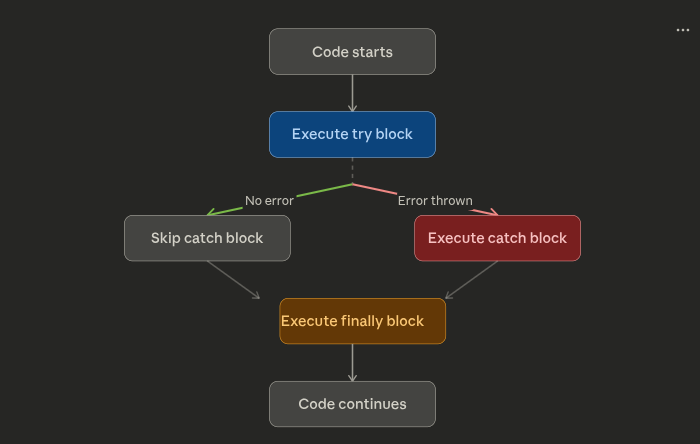
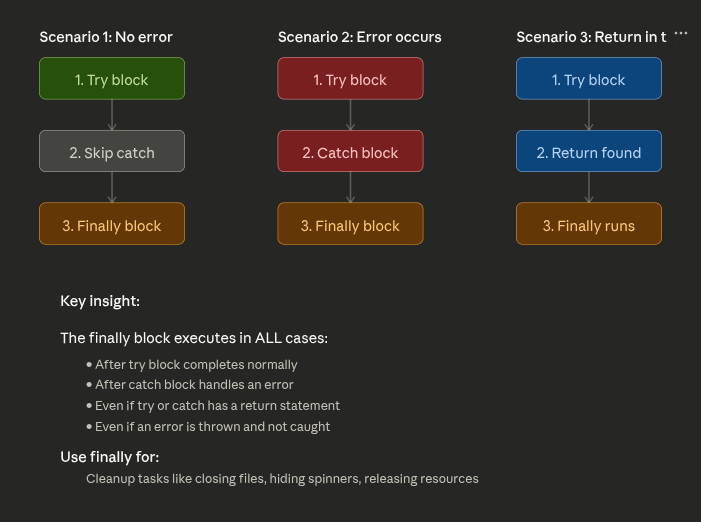
The finally block runs regardless of whether an error occurred or not. It's useful for cleanup operations—closing database connections, stopping spinners, releasing resources.
Structure:
try {
  // Risky code
} catch (error) {
  // Handle error
} finally {
  // Always runs
}
Real Example — File Operations:
let fileHandle;
try {
  fileHandle = openFile('data.txt');
  processFile(fileHandle);
} catch (error) {
  console.error("File processing failed:", error);
} finally {
  if (fileHandle) {
    closeFile(fileHandle); // Always close, even if error occurred
  }
}
Another Example — Loading States:
try {
  showLoadingSpinner();
  const data = await fetchData();
  displayData(data);
} catch (error) {
  showErrorMessage("Failed to load data");
} finally {
  hideLoadingSpinner(); // Always hide, success or fail
}
The finally block runs even if you return inside try or catch:
function example() {
  try {
    return "from try";
  } finally {
    console.log("finally runs anyway"); // This always logs
  }
}
4. Throwing Custom Errors
Sometimes built-in errors aren't enough. You can create your own errors with the throw statement for specific business logic.
Basic Custom Error:
function validateAge(age) {
  if (age < 0) {
    throw new Error("Age cannot be negative");
  }
  if (age < 18) {
    throw new Error("User must be at least 18 years old");
  }
  return true;
}

try {
  validateAge(-5);
} catch (error) {
  console.log(error.message); // "Age cannot be negative"
}
Custom Error Classes:
class ValidationError extends Error {
  constructor(message) {
    super(message);
    this.name = "ValidationError";
  }
}

class AuthenticationError extends Error {
  constructor(message) {
    super(message);
    this.name = "AuthenticationError";
  }
}

// Usage
try {
  if (!user) {
    throw new AuthenticationError("User not logged in");
  }
} catch (error) {
  if (error instanceof AuthenticationError) {
    redirectToLogin();
  }
}
Why Custom Errors Matter:
Specific error types help you handle different failures differently
Better debugging with meaningful error names
Enables complex error handling logic
Makes code self-documenting
5. Why Error Handling Matters
Error handling separates amateur code from production-grade applications. Here's why it's critical:
Graceful Failure
Without error handling, one error crashes everything. With it, your app continues running:
// WITHOUT error handling — whole page breaks
const users = [];
users.forEach(user => {
  console.log(user.profile.name); // If one user has no profile, crash!
});

// WITH error handling — continues gracefully
const users = [];
users.forEach(user => {
  try {
    console.log(user.profile.name);
  } catch (error) {
    console.log("Skipping user with missing profile");
  }
});
Better User Experience
Users shouldn't see cryptic error messages:
// Bad
try {
  fetchData();
} catch (error) {
  console.log(error); // Confuses users
}

// Good
try {
  fetchData();
} catch (error) {
  showUserMessage("We're having trouble loading your data. Please try again.");
}
Debugging Benefits
Proper error handling makes finding bugs faster:
try {
  process.execute();
} catch (error) {
  console.error("Process failed at:", error.stack);
  logToMonitoringService(error); // Send to error tracking (Sentry, Rollbar)
}
Production-Ready Code
Real applications handle network failures, invalid data, and unexpected inputs:
async function createUser(userData) {
  try {
    // Validate input
    if (!userData.email) {
      throw new ValidationError("Email is required");
    }

    // Call API
    const response = await fetch('/api/users', {
      method: 'POST',
      body: JSON.stringify(userData)
    });

    if (!response.ok) {
      throw new Error(`Server error: ${response.status}`);
    }

    return await response.json();
  } catch (error) {
    if (error instanceof ValidationError) {
      return { success: false, reason: "validation", message: error.message };
    } else if (error instanceof TypeError) {
      return { success: false, reason: "network", message: "Connection failed" };
    } else {
      return { success: false, reason: "unknown", message: error.message };
    }
  }
}
Key Takeaways
Always use try-catch for risky operations (API calls, JSON parsing, DOM access)
Finally blocks are perfect for cleanup tasks
Custom errors make your code more specific and maintainable
Error messages matter—write them for users, not for developers
Never ignore errors—always handle them, at minimum by logging
Error handling isn't just about fixing crashes—it's about building applications that feel reliable and professional.
happy coding...

