
JavaScript String Methods: From Built-ins to Polyfills

Understanding String Methods Conceptually
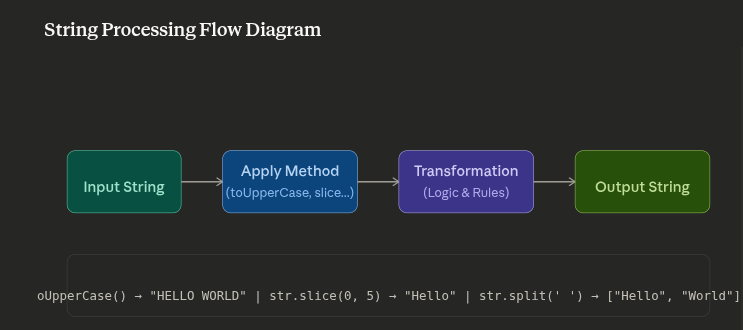
String methods are built-in functions attached to the String prototype that allow you to manipulate, analyze, and transform strings. Every string in JavaScript is an object, and it inherits these methods automatically.
When you create a string, JavaScript wraps it in a String object:
const message = "Hello, World!";
message.toUpperCase();      // "HELLO, WORLD!"
message.substring(0, 5);    // "Hello"
message.includes("World");  // true
Why This Matters: String methods are solving specific problems. When you understand the problem and how it solves it, the method becomes intuitive rather than memorized.
Categories of String Methods
Case transformations: toUpperCase(), toLowerCase()
Search and retrieval: indexOf(), includes(), startsWith(), endsWith()
Extraction: substring(), slice(), charAt()
Transformation: replace(), split(), trim(), repeat()
Pattern matching: match(), search() (regex-based)
Why Developers Write Polyfills
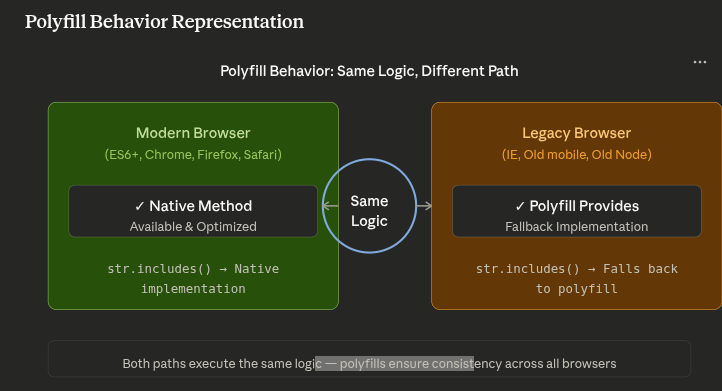
Polyfills are code snippets that provide functionality for older browsers that don't natively support certain features. For strings, this means implementing methods that may not exist in older JavaScript environments.
The Real Problem
Modern JavaScript introduced powerful string methods like includes(), startsWith(), and padStart(). However:
Internet Explorer doesn't support ES6+ string methods
Older mobile browsers may lack newer functionality
Legacy systems still run outdated JavaScript engines
Users can't update their browsers overnight
When to Write Polyfills
You should write polyfills when:
Your application supports legacy browsers
You need a method that isn't universally available
You want to provide fallback behavior
You're building a library that needs broad compatibility
Example: Polyfill for String.includes()
// Polyfill for String.prototype.includes
if (!String.prototype.includes) {
    String.prototype.includes = function(searchString, position) {
        // Convert position to integer, default to 0
        position = position || 0;

        // Return true if searchString is found at or after position
        return this.indexOf(searchString, position) !== -1;
    };
}

// Now it works everywhere!
"Hello World".includes("World");  // true (works in IE now)
Common Interview String Problems
Technical interviews love string problems because they test both algorithm thinking and JavaScript fundamentals.
Problem 1: Reverse a String
// Method 1: Loop from end to start
function reverseString(str) {
    let reversed = "";
    for (let i = str.length - 1; i >= 0; i--) {
        reversed += str[i];
    }
    return reversed;
}

// Method 2: Built-in methods (elegant)
function reverseStringBuiltIn(str) {
    return str.split("").reverse().join("");
}

// Method 3: Recursion
function reverseStringRecursive(str) {
    return str === "" ? "" : reverseStringRecursive(str.slice(1)) + str[0];
}

// Test
console.log(reverseString("Hello"));  // "olleH"
Problem 2: Check for Palindrome
function isPalindrome(str) {
    // Clean: remove non-alphanumeric, convert to lowercase
    const cleaned = str.toLowerCase().replace(/[^a-z0-9]/g, "");

    // Compare with reverse
    return cleaned === cleaned.split("").reverse().join("");
}

// Optimized: Two-pointer approach (O(n) time, O(1) space)
function isPalindromeOptimized(str) {
    const cleaned = str.toLowerCase().replace(/[^a-z0-9]/g, "");
    let left = 0;
    let right = cleaned.length - 1;

    while (left < right) {
        if (cleaned[left] !== cleaned[right]) {
            return false;
        }
        left++;
        right--;
    }
    return true;
}

// Test
console.log(isPalindrome("A man, a plan, a canal: Panama"));  // true
console.log(isPalindrome("race a car"));                       // false
Problem 3: First Non-Repeating Character
function firstNonRepeatingChar(str) {
    // Count character frequencies
    const charCount = {};
    for (let char of str) {
        charCount[char] = (charCount[char] || 0) + 1;
    }

    // Find first character with count 1
    for (let char of str) {
        if (charCount[char] === 1) {
            return char;
        }
    }
    return null;
}

// Test
console.log(firstNonRepeatingChar("leetcode"));        // 'l'
console.log(firstNonRepeatingChar("loveleetcode"));    // 'v'
console.log(firstNonRepeatingChar("aabbcc"));          // null
Problem 4: Valid Parentheses
function isValidParentheses(str) {
    const stack = [];
    const pairs = {
        ')': '(',
        ']': '[',
        '}': '{'
    };

    for (let char of str) {
        if (char === '(' || char === '[' || char === '{') {
            stack.push(char);
        } else if (char === ')' || char === ']' || char === '}') {
            if (stack.length === 0 || stack.pop() !== pairs[char]) {
                return false;
            }
        }
    }

    return stack.length === 0;
}

// Test
console.log(isValidParentheses("([{}])"));  // true
console.log(isValidParentheses("([)]"));    // false
Problem 5: Longest Substring Without Repeating Characters
function longestSubstringLength(str) {
    let maxLength = 0;
    let charIndex = {};
    let left = 0;

    for (let right = 0; right < str.length; right++) {
        const char = str[right];

        // If char was seen and is in current window
        if (charIndex[char] !== undefined && charIndex[char] >= left) {
            left = charIndex[char] + 1;
        }

        charIndex[char] = right;
        maxLength = Math.max(maxLength, right - left + 1);
    }

    return maxLength;
}

// Test
console.log(longestSubstringLength("abcabcbb"));  // 3 ("abc")
console.log(longestSubstringLength("bbbbb"));     // 1 ("b")
console.log(longestSubstringLength("au"));        // 2
Why Understanding Built-in Behavior Matters
Many developers use string methods without understanding what happens under the hood. This gap has real consequences:
Debugging gets easier: When something breaks, you can think through the logic instead of guessing.
You write better code: Knowing performance characteristics helps you choose the right method.
Interview confidence: You can solve unfamiliar problems by implementing solutions from scratch.
Optimization opportunities: You spot inefficiencies that would otherwise be invisible.
Cross-language skills: Logic transfers to Python, Java, Go—any language.
Common Mistakes That Reveal Shallow Understanding
Using
indexOf() !== -1instead ofincludes()Creating unnecessary string copies with multiple chains
Not understanding that strings are immutable in JavaScript
Using regex where a simple string method would work
Not trimming input before validation
Building Your Mental Model
Use the method in code: Apply it in real projects, not just tutorials
Write a polyfill: Implement the method yourself
Read the spec: Look at how ECMAScript defines the method
Test edge cases: What happens with empty strings? Special characters?
Solve interview problems: Apply your knowledge to new situations
happy coding...

