
=> Arrow Function
The modern, shorter way to write functions. Less typing, cleaner code, same power.
if you've been writing JavaScript for a while, you've almost certainly seen this syntax: const greet = name => Hello, ${name}!. Compact. Readable. A little mysterious if you're new. That's an arrow function — and once you understand it, you'll want to use it everywhere.
Arrow functions don't replace regular functions entirely — but for most everyday tasks, they make your code shorter and cleaner. Let's break it all down, step by step.
What is an Arrow Function?
Before ES6 (2015), JavaScript had only one way to define a function — using the function keyword. Arrow functions are a newer, shorter syntax introduced in ES6 that does the same job with considerably less boilerplate.
They are called arrow functions because of the => symbol (the "fat arrow") that sits between the parameters and the function body. That one symbol replaces the entire function keyword.
💡 The big idea
Arrow functions don't replace regular functions entirely — but for everyday tasks like transforming data, writing callbacks, and simple calculations, they are the modern preferred style. Once you know them, you'll see them everywhere in real codebases.
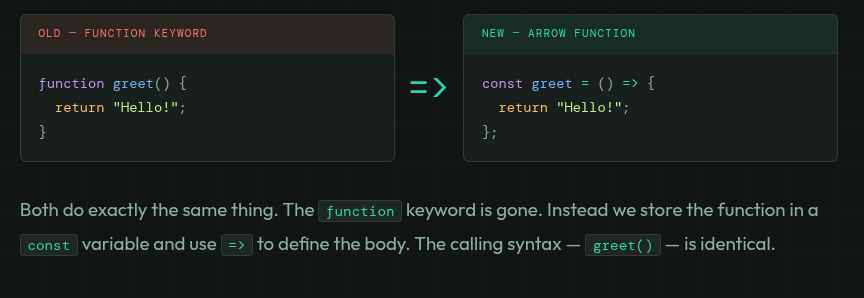
Here's the quickest side-by-side to see what changes and what stays the same:
Basic Arrow Function Syntax
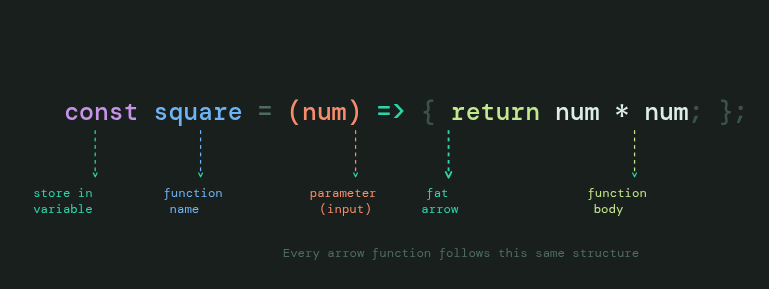
Let's dissect the anatomy of an arrow function so every part is crystal clear before we start using shortcuts.
// Normal function
function square(num) {
  return num * num;
}

// Arrow function — same thing, shorter
const square = (num) => {
  return num * num;
};

// Calling both is identical
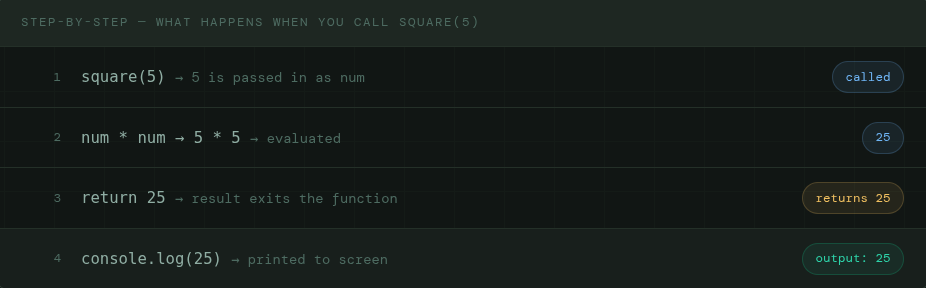
console.log(square(5));  // 25
console.log(square(9));  // 81
Arrow Functions with One Parameter
When your arrow function takes exactly one parameter, JavaScript lets you drop the parentheses around it. Both versions are valid — but without parentheses is the more common modern style you'll see in real code.

// One param — parens are optional
const double = n => {
  return n * 2;
};

const greet = name => {
  return "Hello, " + name + "!";
};

console.log(double(7));        // 14
console.log(greet("Kalpesh")); // Hello, Kalpesh!
⚠ Exception — zero params always need parens
If your function has no parameters, you must keep the empty parentheses:
const sayHi = () => { ... }. Dropping parens is only allowed when there is exactly one parameter.
Arrow Functions with Multiple Parameters
When your function takes two or more parameters, the parentheses are required — no shortcuts. Always wrap them.
multi-param.js
// Two params — parentheses required
const add      = (a, b) => { return a + b; };
const multiply = (a, b) => { return a * b; };

const introduce = (firstName, lastName) => {
  return "My name is " + firstName + " " + lastName;
};

console.log(add(3, 7));                    // 10
console.log(multiply(4, 5));               // 20
console.log(introduce("Riya", "Sharma"));  // My name is Riya Sharma
Implicit Return vs Explicit Return
This is where arrow functions truly shine. If your function body is just a single expression that evaluates to a value, you can remove the curly braces and the return keyword. JavaScript returns the expression automatically. This is called an implicit return.
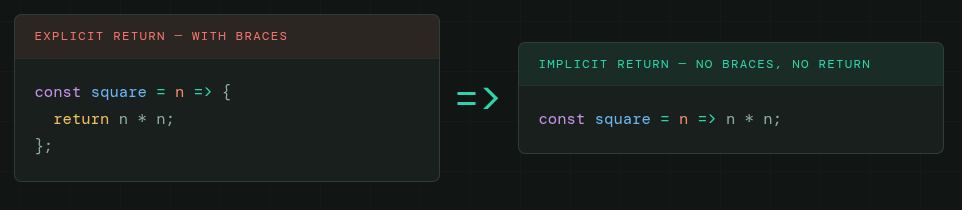
Both produce identical results. When you remove the curly braces, the return is implied. The expression after => is automatically returned.
implicit-return.js
// Explicit — the long way
const squareLong = (n) => { return n * n; };

// Implicit — the short way ✨
const square  = n => n * n;
const double  = n => n * 2;
const isEven  = n => n % 2 === 0;
const greet   = name => "Hello, " + name;
const add     = (a, b) => a + b;

console.log(square(6));          // 36
console.log(isEven(4));          // true
console.log(isEven(7));          // false
console.log(greet("Arjun"));    // Hello, Arjun
console.log(add(10, 20));       // 30
⚠ When you cannot use implicit return
If your function needs more than one line — a variable declaration, an if/else, multiple statements — you must use curly braces and write
returnexplicitly. Implicit return is only for single-expression functions.
// Single expression — implicit return ✅
const isEven = n => n % 2 === 0;

// Multiple lines — braces + return required ✅
const describeNumber = n => {
  const type = n % 2 === 0 ? "even" : "odd";
  return n + " is " + type;
};

console.log(describeNumber(7)); // 7 is odd
console.log(describeNumber(4)); // 4 is even
One of the most common places you'll see implicit return is inside map() — it makes the code read almost like plain English:
arrow-with-map.js
const numbers = [1, 2, 3, 4, 5];

// Arrow function inside map — short and clean
const squared = numbers.map(n => n * n);
console.log(squared);
// [1, 4, 9, 16, 25]

// Compare with regular function inside map — verbose
const squared2 = numbers.map(function(n) {
  return n * n;
});
// Exact same result, but 3 lines vs 1

// Even/odd label using arrow inside map
const labels = numbers.map(n => n % 2 === 0 ? "even" : "odd");
console.log(labels);
// ['odd', 'even', 'odd', 'even', 'odd']
✨ Why this matters for you
Arrow functions were designed to work beautifully inside array methods like
map(),filter(), andreduce(). The short syntax keeps everything readable — especially when building projects like REQFORGE where you'll be transforming data constantly.
Arrow vs Normal Function — Key Differences
For beginners, the biggest difference is syntax — arrow functions are shorter. Here's the same three functions written both ways so you can feel the contrast:
side-by-side.js
// ── Regular function syntax ──────────────
function square(n)    { return n * n;          }
function add(a, b)  { return a + b;          }
function greet(name) { return "Hi, " + name;  }

// ── Arrow function syntax ────────────────
const square = n         => n * n;
const add    = (a, b)   => a + b;
const greet  = name      => "Hi, " + name;

// All six produce identical results
console.log(square(4));       // 16
console.log(add(3, 5));      // 8
console.log(greet("Riya"));  // Hi, Riya
Beyond syntax, there are a few other differences worth knowing at this stage:
| Feature | Normal Function | Arrow Function |
|---|---|---|
| Syntax | Verbose — uses function keyword |
Short — uses => |
| Implicit return | ✗ Always needs return |
✓ Can drop braces and return |
| Hoisting | ✓ Can call before declaration | ✗ Must declare before calling |
this keyword |
Has its own this context |
Inherits this from parent scope (covered later) |
| Best used for | Standalone named functions, class methods | Callbacks, array methods, short helpers |
💡 Beginner rule of thumb
When passing a function into
map(),filter(),reduce(), orforEach()— use an arrow function. For standalone named functions that live at the top of your file — either style works, but traditionalfunctiondeclarations are slightly safer because of hoisting.
Assignment
Practice time
Task 01 — Conversion
Write a normal function square that returns n * n. Then rewrite it as an arrow function — first with explicit return, then with implicit return. Make sure all three give the same output.
task-01.js
// Step 1 — normal function
function square(n) {
  // your code here
}

// Step 2 — arrow, explicit return
const squareArrow = (n) => {
  // your code here
};

// Step 3 — arrow, implicit return (one line!)
const squareShort = /* complete this */
Task 02 — Even or odd
Write an arrow function isEven that returns true for even numbers and false for odd ones. Use implicit return. Test it with: 4, 7, 0, 13, 100.
task-02.js
const isEven = /* your arrow function */

console.log(isEven(4));    // true
console.log(isEven(7));    // false
console.log(isEven(0));    // true
console.log(isEven(13));   // false
console.log(isEven(100));  // true
Task 03 — Arrow inside map()
Use the array below. Use map() with an arrow function to double every number. Then use another map() to label each as "even" or "odd".
task-03.js
const numbers = [3, 8, 15, 4, 11];

// Task A — double every number using map + arrow
const doubled = numbers.map(/* arrow function */);

// Task B — label each as "even" or "odd"
const labels  = numbers.map(/* arrow function */);

console.log(doubled); // [6, 16, 30, 8, 22]
console.log(labels);  // ['odd','even','odd','even','odd']
Task 04 — Reflection
In a comment inside your code, answer: "When would you choose an arrow function over a regular function? Give one real scenario from a project you're building or planning."
Functions are the building blocks of everything in JavaScript.
open console, start typing...


