
Flattening Nested Arrays

What they are, why they matter, and four different ways to squash deep structure into a clean, single-level array — with interview scenarios included.
01. What Are Nested Arrays?
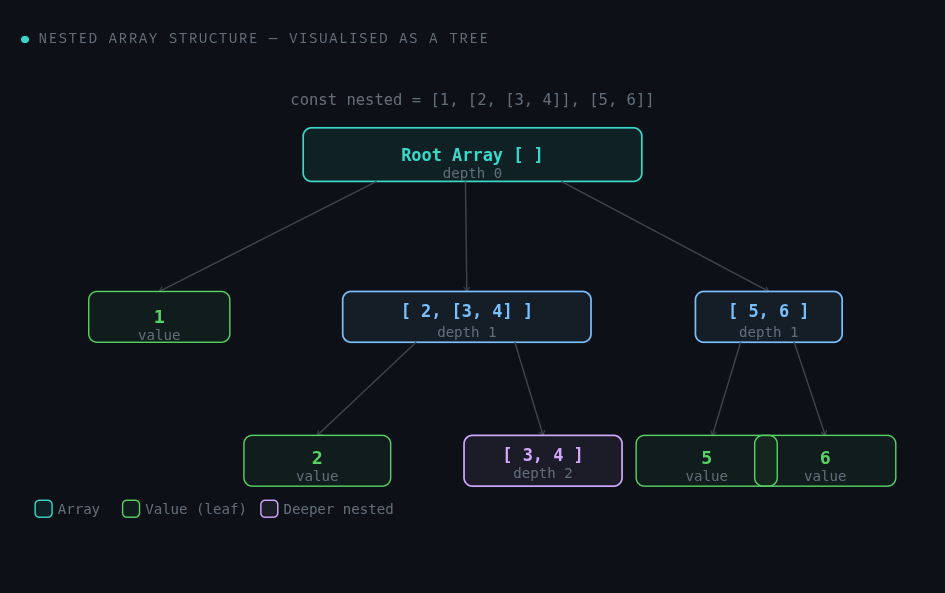
A nested array is simply an array that contains other arrays as its elements — and those inner arrays can themselves contain more arrays. This is also called a multi-dimensional array or an array of arrays.
nested-arrays.js
// Depth 1 — one level of nesting
const d1 = [1, [2, 3], [4, 5]];

// Depth 2 — arrays inside arrays inside an array
const d2 = [1, [2, [3, 4]], [5, [6]]];

// Depth 3 — deeply nested
const d3 = [1, [2, [3, [4, [5]]]]];

// Real-world example: grouped categories from an API
const categories = [
  ['html', 'css'],
  ['javascript', ['react', 'vue']],
  ['node', 'express']
];
Every element of an array can be a value (1, "hello") or another array. JavaScript doesn't restrict how deep you can nest — which is powerful but can become hard to work with when you just want a flat list of values.
02 .Why Flatten Arrays?
Nested arrays arise naturally — APIs return paginated data in chunks, form submissions group related fields, file system trees branch by folder. But once you have the data, you often just want a flat list to iterate over, search, or display.
Common Real-World Triggers
API responses — multiple pages of results returned as arrays of arrays
User-selected categories — each category has a list of items, and you want all items combined
Matrix operations — turning a 2D grid of coordinates into a 1D list for processing
Search indexing — flattening tagged content so every tag is searchable individually
real-world.js
// ❌ Without flattening — awkward to loop over pages
const pages = [
  [{ id: 1, name: 'Alice' }, { id: 2, name: 'Bob' }],
  [{ id: 3, name: 'Carol' }]
];

// You're forced to use nested loops:
pages.forEach(page => page.forEach(user => process(user)));

// ✅ After flattening — clean single loop
const allUsers = pages.flat();
allUsers.forEach(user => process(user)); // clean
Rule of thumb: If you find yourself writing nested
forEachor nestedmaploops just to access values, flattening first will almost always simplify your code.
03. The Concept — Step by Step
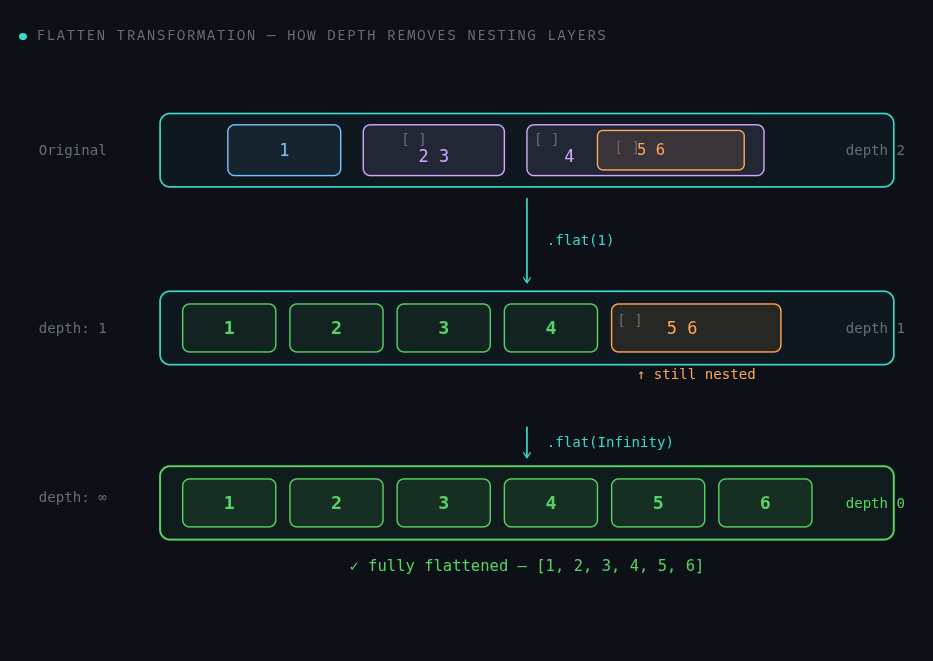
Flattening means taking a nested array and collapsing inner arrays into the outer array until you get a single-level (or shallower) result. The key mental model: treat brackets as walls, and flatten removes walls.
Step-by-step Mental Model
Think of the nested array as layers of boxes. Flattening depth 1 opens the outermost inner boxes and dumps their contents into the parent.
concept.js
const input = [1, [2, 3], [4, [5, 6]]];

// ── Step 1: Walk each element ─────────────────────
//   1        → number   → keep as-is  → 1
//  [2, 3]    → array    → spread out  → 2, 3
//  [4,[5,6]] → array    → spread out  → 4, [5, 6]

// ── After depth=1 flat ───────────────────────────
// [1, 2, 3, 4, [5, 6]]   <-- [5,6] still nested

// ── After depth=2 flat ───────────────────────────
// [1, 2, 3, 4, 5, 6]     <-- fully flat!
The depth parameter controls how many layers of nesting to peel away. Depth 1 opens one layer. Depth 2 opens two. Infinity keeps going until no arrays remain, regardless of how deep the nesting goes.
04. Four Ways to Flatten Arrays
Each approach has a different use case, performance characteristic, and level of browser/Node support. Know all four — interviewers love asking you to implement the manual versions.
① Array.flat() — the modern built-in
easiestES2019
const arr = [1, [2, [3, [4]]]];

arr.flat();           // [1, 2, [3, [4]]]  — depth 1 by default
arr.flat(2);          // [1, 2, 3, [4]]    — two levels
arr.flat(Infinity);   // [1, 2, 3, 4]      — fully flat

// Bonus: .flat() also removes empty slots
const sparse = [1, , 2, [3]];
sparse.flat(); // [1, 2, 3] — hole removed
② flatMap() — map + flatten in one pass
commonES2019
// flatMap = .map(...).flat(1) — but more efficient
const sentences = ['hello world', 'foo bar'];

// Without flatMap — nested result
sentences.map(s => s.split(' '));
// [['hello','world'], ['foo','bar']]  ← nested

// With flatMap — clean flat result
sentences.flatMap(s => s.split(' '));
// ['hello', 'world', 'foo', 'bar']   ← flat

// Only flattens one level — by design
③ reduce() + concat — the classic manual way
interview fav
// Single level — using reduce + concat
function flattenOne(arr) {
  return arr.reduce((acc, val) => {
    return acc.concat(val);
  }, []);
}

flattenOne([1, [2, 3], [4]]); // [1, 2, 3, 4]

// Deep version — recursion added
function flattenDeep(arr) {
  return arr.reduce((acc, val) => {
    return Array.isArray(val)
      ? acc.concat(flattenDeep(val))  // recurse
      : acc.concat(val);                // base case
  }, []);
}

flattenDeep([1, [2, [3, [4]]]]); // [1, 2, 3, 4]
④ Recursive spread — clean modern syntax
advanced
// Recursive with spread operator
function flatten(arr) {
  return [].concat(...arr.map(item =>
    Array.isArray(item) ? flatten(item) : item
  ));
}

// With depth control — more like the built-in
function flattenN(arr, depth = 1) {
  if (depth === 0) return [...arr]; // base case
  return arr.reduce((acc, val) => {
    Array.isArray(val)
      ? acc.push(...flattenN(val, depth - 1))
      : acc.push(val);
    return acc;
  }, []);
}

flattenN([1, [2, [3]]], 1); // [1, 2, [3]]
flattenN([1, [2, [3]]], 2); // [1, 2, 3]
Quick Comparison
| Method | Depth Control | Performance | Use When |
|---|---|---|---|
| .flat() | Yes | Fast (native) | Modern codebase, any depth |
| .flatMap() | Always depth 1 | Fast (native) | Mapping and flattening together |
| reduce + concat | With recursion | Moderate | Interview questions, custom logic |
| Recursive spread | With depth param | Moderate | Demonstrating recursion + spread |
In production: Always reach for
.flat()or.flatMap(). The manual implementations are for learning the underlying mechanics — which is exactly why interviews ask for them.
05. Common Interview Scenarios
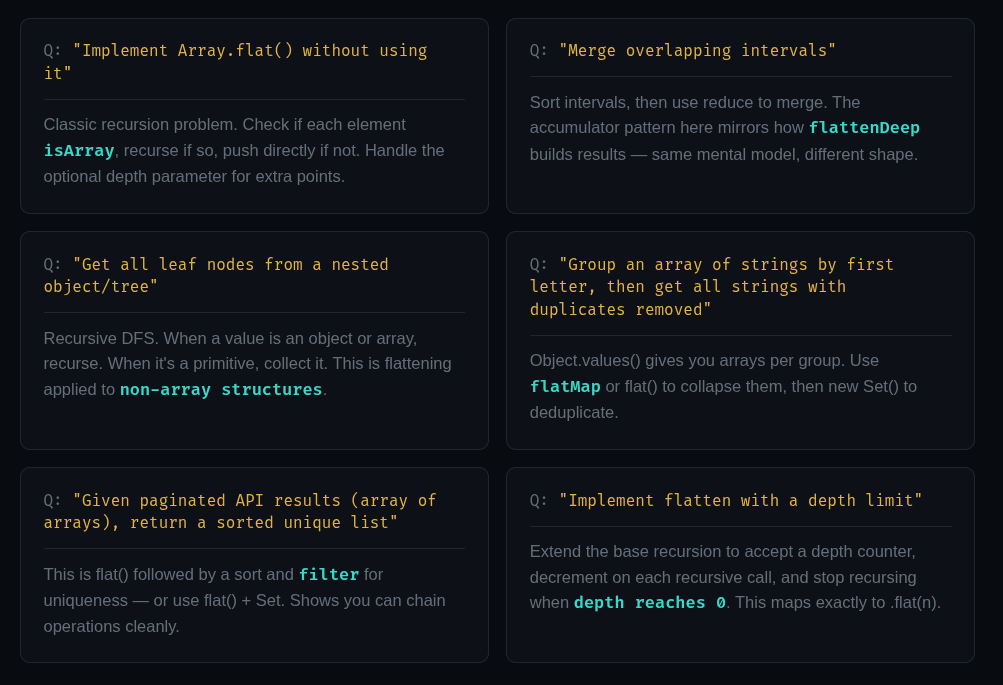
Interviewers test your problem-solving process, not just your syntax recall. For each scenario below, the key is to identify that flattening (or a flatten-like operation) is part of the solution — even when the question doesn't say "array" or "flatten" explicitly.
The Problem-Solving Mindset
When you see a problem with nested data, ask yourself these questions before writing a single line of code:
interview-mindset.js
// Q1: How deep is the nesting?
//     → If always depth 1, .flat() or .flatMap() is fine
//     → If variable/unknown, reach for Infinity or recursion

// Q2: Do I need to transform while flattening?
//     → Yes? Use .flatMap()
//     → No?  Use .flat()

// Q3: Is this a browser environment?
//     → Modern browsers (2019+): built-ins are fine
//     → Must support IE? Write the reduce version

// Q4: Performance-critical path?
//     → Native methods > manual implementations
//     → Iterative stack-based flatten avoids call-stack limits
//       for very deeply nested (1000+ levels) data

// Iterative approach for VERY deep arrays (no stack overflow risk)
function flattenIterative(arr) {
  const stack = [...arr];
  const result = [];
  while (stack.length) {
    const next = stack.pop();
    Array.isArray(next)
      ? stack.push(...next)  // push back onto stack
      : result.unshift(next); // collect leaf value
  }
  return result;
}
Pro tip: The iterative stack approach is the answer that makes interviewers say "nice". Recursive solutions risk stack overflow on deeply nested arrays (thousands of levels). An explicit stack with a
whileloop doesn't have that limitation.
happy coding...


